Ultima User Guide (c) Copyright by PaxeraHealth Corp. 2021
9.4.1. MPR Modes
Each MPR mode will be shown and demonstrated below so that the users can learn about the different MPR modes available within the MPR viewer. For all modes, each colored line refers to a specific plane (coronal, sagittal, transverse). Please note that the same colored line on multiple projections refer to the same plane. For example, moving the blue line on the axial images will move the blue line on the lateral images respectively.
To apply a specific MPR mode:
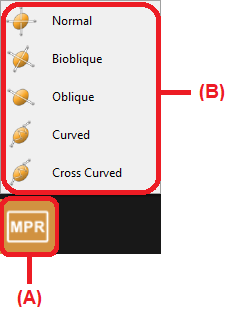
Click on the ‘MPR mode’ button (A)from the toolbox panel at the bottom of the screen.
A pop-up menu will appear, select the mode of interest: Normal /Bioblique / Oblique /Curved /Cross Curved (B).