Ultima User Guide (c) Copyright by PaxeraHealth Corp. 2021
9.4.6. Cross Curved Mode
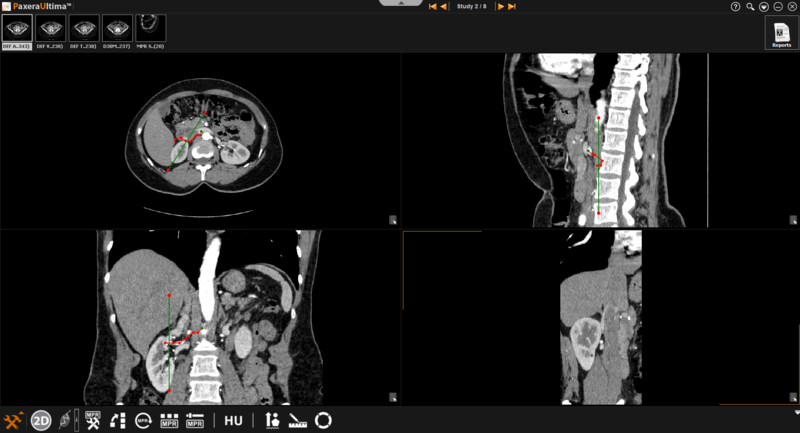
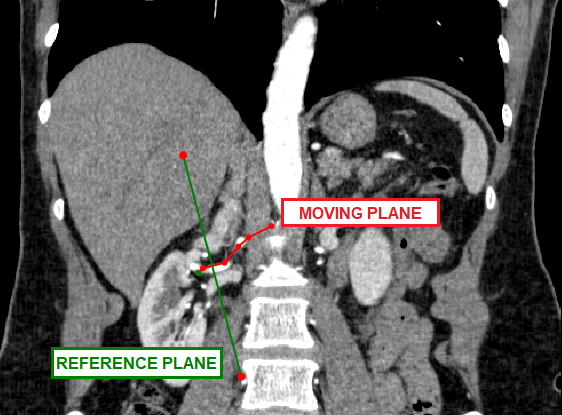
The cross curved mode is similar to the curved mode as the user is able to create a curvature view by clicking on a number of points. However, the curved line that is drawn becomes the "moving plane" and a separate line will appear as a fixed reference plane. The reference plane can be dragged along the traced curvature.
» Reference plane– indicated by the green line (see below). This plane can be moved by clicking and dragging it along the curve (shown in red). The size of the reference plane can also be adjusted by clicking on the either of the red points located at the end points of the green line and dragging it inwards (to decrease size) and outwards (to increase size)
» Moving plane– indicated by the red line. This plane can be created and adjusted as explained above for curved mode.