Ultima User Guide (c) Copyright by PaxeraHealth Corp. 2021
9.4.7. MPR Settings
The MPR settings icon is located on the toolbox panel and enables the user to change the following views:
Normal mode
Reference mode (within Normal and Oblique modes)
Panorama view (within Curved mode)
Reference mode
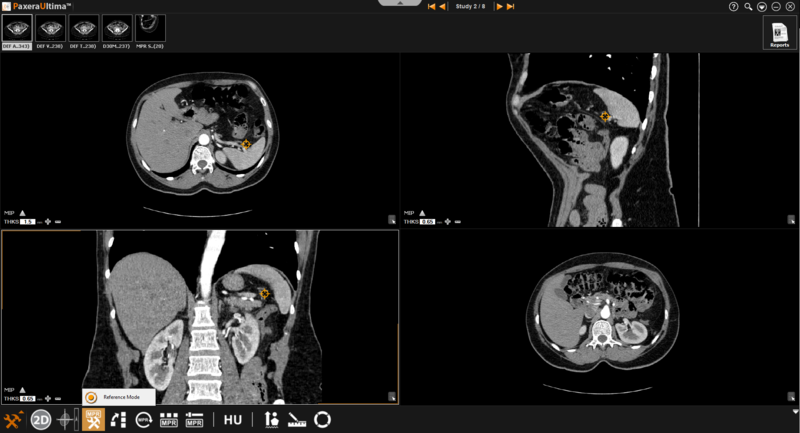
The reference mode is used when the user needs to refer to a specific point (rather than a specific plane). This tool is only accessible from normal & oblique mode
Follow the instructions below to change the image view to 'Reference Mode':
Click on the 'MPR Settings' button from the toolbox panel at the bottom of the screen.
Select the 'Reference Mode' button from the menu.
The lines shown on the image windows will disappear and be replaced with a point on each window.
Click and move the point to see the common coordinate (position) in all views.
Panorama View
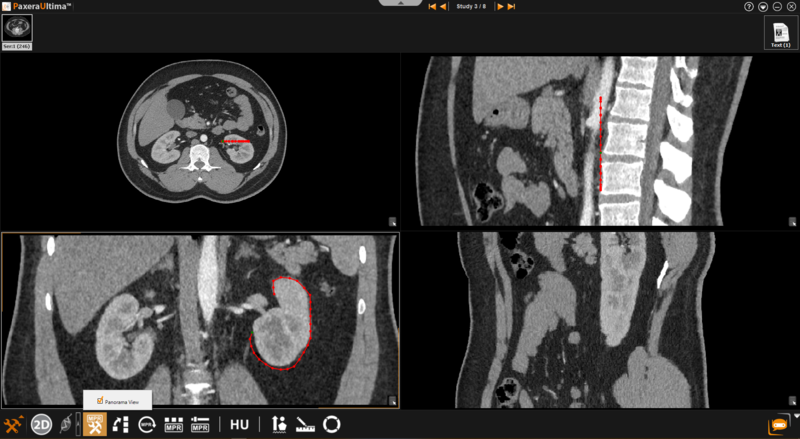
The panorama view is only available when the curved mode is in use. This setting ensures that the panoramic view of the original curve will remain constant on the resultant image regardless of manipulatons made in the other image windows. If this option is not selected, manipulations made in the other windows after the curve is drawn will affect the resultant image. The panorama view is enabled by default.
Follow the instructions below to change the image view to 'Panorama View':
Click on the 'MPR Settings' button from the toolbox panel at the bottom of the screen
Select the 'Panorama View' button from the menu.
Draw the curve and observe the panoramic view on the resultant window.