Ultima User Guide (c) Copyright by PaxeraHealth Corp. 2021
9.4.8. Generate MPR Series
This tool allows the user to set parameters including number of images, slice spacing (mm), and slice thickness (mm) for creating new reconstructed series from the existing series.
You can only generate MPR series in the normal or oblique mode.
Follow the instructions below to learn how to generate an MPR series in normal / oblique mode:
Generate MPR series
Click on 'Generate MPR series' from the bottom toolbar panel.


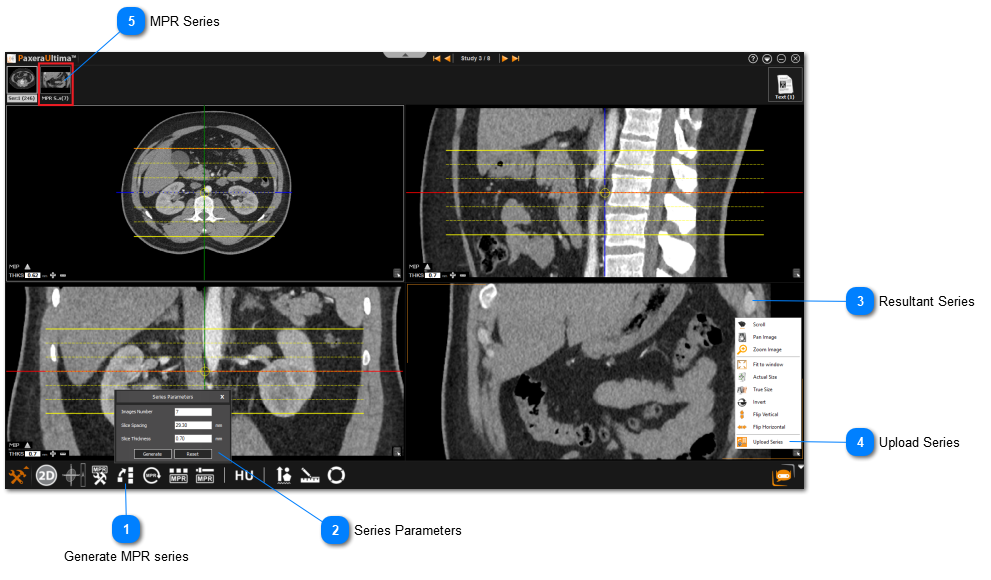


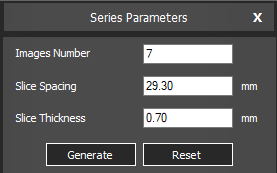



 and select 'Upload Series' to make a new series.