Ultima User Guide (c) Copyright by PaxeraHealth Corp. 2021
8.8.0. Viewing Protocols
In this section the user will learn how to switch between viewing protocols (VP) to adjust the screen layout. An unlimited amount of VPs can be created and specific VPs can be set as the default for different modalities and/or users.
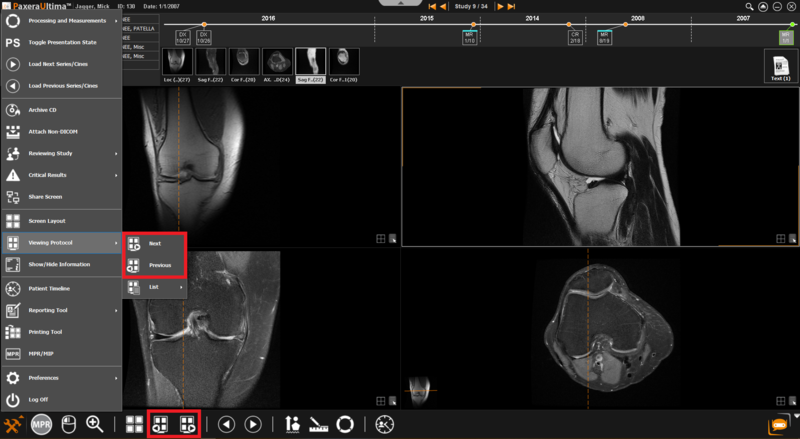
The user can easily switch between VP while viewing a study. Instructions are given below:
1. Click on the Main Toolbox menu button located in the bottom left corner of the screen:
2. Go to Viewing Protocol > Next OR Previous(you can also access these buttons from your bottom shortcuts panel)
More on VPs
To learn how to access the VP preferences to create, edit, delete, and use VP - click here.
Save current screen layout as VP
From the main study viewer, the user can adjust the screen layout to the required format and then right click anywhere on the viewer and click ‘Save as new VP', enter all the necessary information and then click on ‘Save’. Click here for more detailed instructions on this.