Ultima360
User guide
×
Menu
Index

19.1.4. General Settings

 
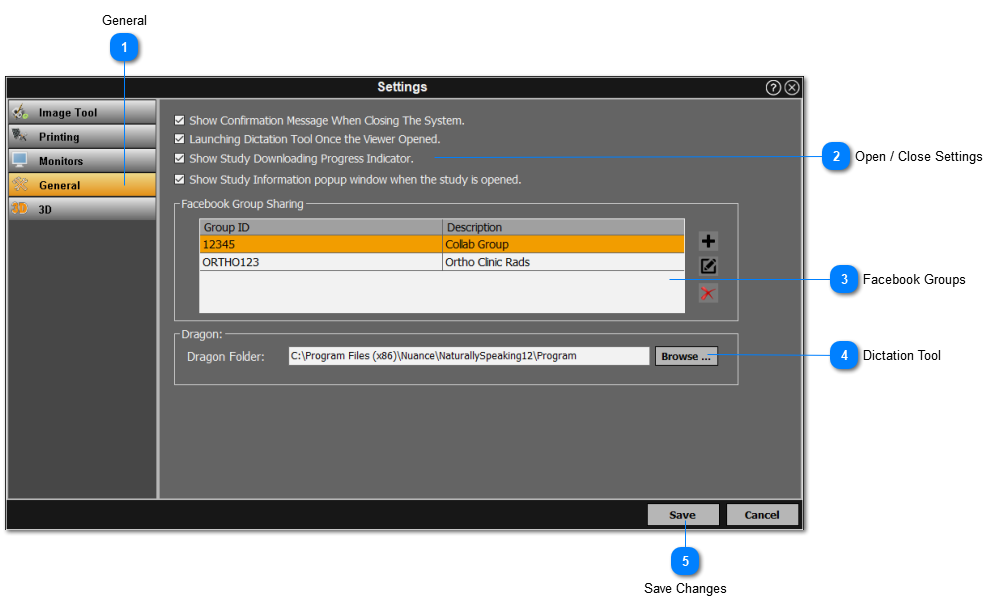
The general settings enables the user some general settings when launching and closing Ultima; and also enables the user to add, edit, and delete groups for sharing studies on facebook. Simply follow the instructions below:
 
19.1.4. General Settings
 
1

General

1. General
Click on the 'General' section from the left panel.
2

Open / Close Settings

2. Open / Close Settings
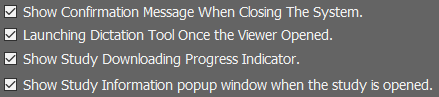
Select the actions to be performed automatically when opening / closing a study.
3

Facebook Groups

3. Facebook Groups
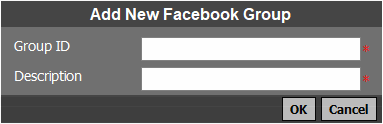
The user can add / edit / delete Facebook groups for collaboration using these buttons respectively.
To add a new group, create a group ID and enter a description as shown in the menu above.
4

Dictation Tool

4. Dictation Tool
Use the 'browse' button to select the directory where the dictation tool is located.
5

Save Changes

5. Save Changes
Click on 'Save' to save the changes made in the general settings.