Ultima User Guide (c) Copyright by PaxeraHealth Corp. 2021
8.6.0. Presentation States (PS)
In this section the user will learn how to create and use presentation states (PS).
A presentation state (PS) is a DICOM object for grayscale or color rendering transformation applied to images for display. These objects support grayscale and true color images, as well as the application of a pseudo-color lookup table to grayscale images. Presentation states can also save any zooming and panning (displayed area selection) applied.
The user can create a presentation state for a particular image that has already been processed with additional adjustments in window settings, shutter application, measurements, annotations etc. This allows other users to view the changes of the PS as an overlay.
In this section the user will learn how to:
• Access PS tools - to view existing PS in a study
• Add new PS - in order to save the PS as an overlay on the image or series
• PS editor - to replace or delete PS
Other tools can be used with PS, as described below:
• Export PS - export PS to a directory, jpeg, tif etc.
• Upload PS - upload PS to new series so that its saved and printed on the image
• Share PS - share the PS to Facebook / Twitter / email / Google drive etc.
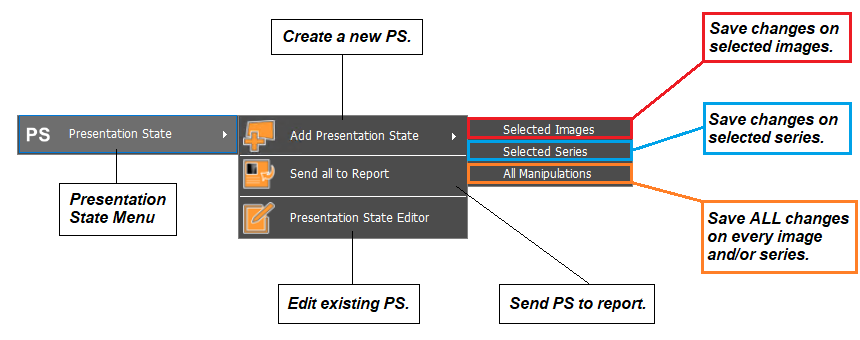
To access the PS tool, simply right click on the image of interest from the study viewer. A dropdown list will appear, click on ‘Presentation State’. An overview of the PS tool is given below: