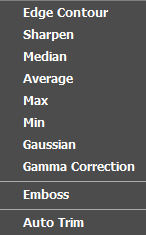
Image filters are used to change the vision of the image, or a region of the image.
Examples of the different image filter options available:
|
Edge contour
|
Emphasizes image points that have a significant intensity difference between pixels
|
|
Sharpen
|
Emphasizes the edges of the image
|
|
Median
|
Removes noise from an image
|
|
Average
|
Removes noise from an image
|
|
Max
|
Removes negative outlier noise
|
|
Min
|
Removes positive outlier noise
|
|
Gaussian
|
Blurs the image
|
|
Gamma correction
|
Controls the overall brightness of an image
|
|
Emboss
|
Indicates the rate of color change
|
|
Autotrim
|
Removes the extra blank space on the side of the image
|
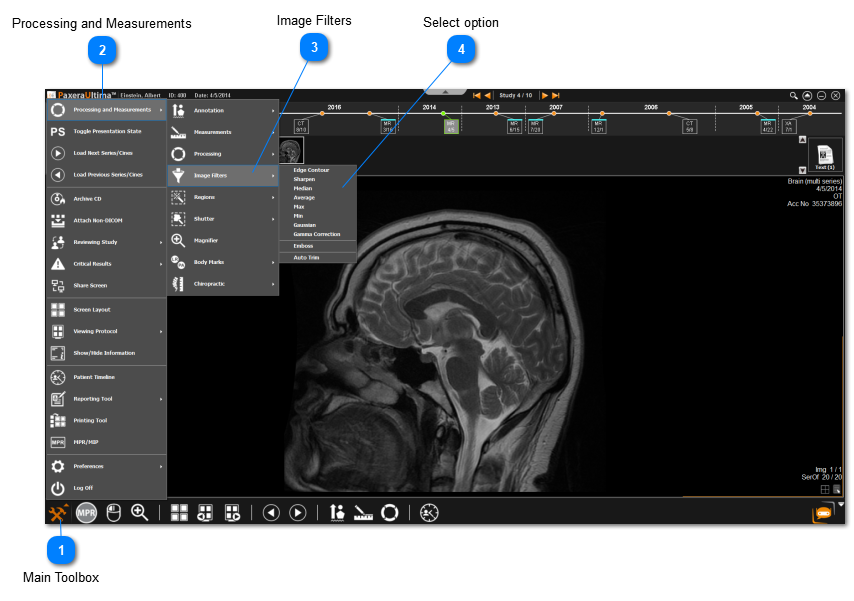
 Main ToolboxClick on the Main Toolbox from the bottom left corner.
|
|
 Processing and MeasurementsClick on Processing and Measurements from the menu.
|
|
 Image FiltersClick on Image Filters.
|
|
 Select optionChoose the filter you want to apply onto the image.
|
|