Ultima User Guide (c) Copyright by PaxeraHealth Corp. 2021
8.5.3. Measurements
Measurements are used to measure specific areas or angles on an image
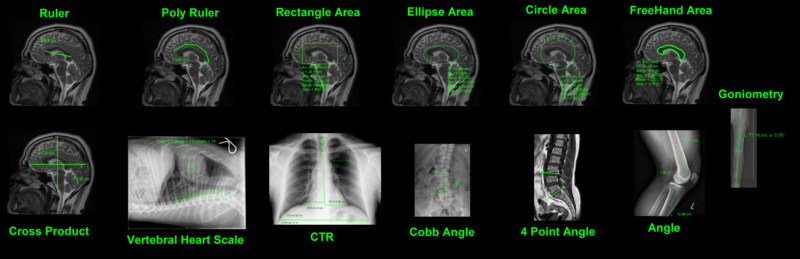
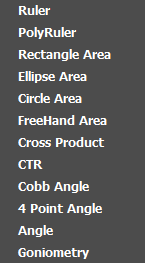
Examples of the different measurements available:
Ruler
Click & drag the mouse to draw a line.
Polyruler
Click & drag mouse to draw the first line, and then click every time the for a new line, right click to end the line.
Rectangle Area
Click & drag the mouse from the corner of the rectangle to draw a rectangle
Ellipse Area
Click & drag the mouse to draw an ellipse.
Circle Area
Choose the required size of the circle form the drop-down list and then click on the image to place it
Freehand Area
Hold in mouse click and draw freehand region of interest
Cross Product
Hold in mouse click on start of cross product, drag the mouse to expand
Angle
Click & drag mouse to draw the first line, then click to produce the second line for the angle
CTR
Cardiothoracic Ratio: click & drag mouse to draw line down spine, then repeat to draw perpendicular lines for the MLD, MRD, and TD.
Vertebral Heart Scale
Click & drag the mouse to cover the area of the heart. Indicators for T4-T12 will appear; drag them to the correct position.
Cobb Angle
Click & drag mouse to create line parallel to superior end of vertebrae, and then repeat for inferior end of vertebra.
4 Point Angle
Click & drag mouse to create the first line, then let go of mouse click and repeat to create second line. The angle between the lines will show.
Goniometry
Click on the image to place 7 points in this order: femoral head, lateral intercondylar tubercle, medial intercondylar tubercle, lateral femoral condyle, medial femoral condyle, lateral malleolus, medial malleolus.
Edit measurements
To learn how to use edit the appearance of the annotations, including the color of the annota- tion, color of the text; font size, font appearance; and line thickness; see page 74
Access measurement tools from study viewer
From the study viewer, the user can right click on any window and select ‘Measurement’ to ac- cess the measurement tools
CTR measurement
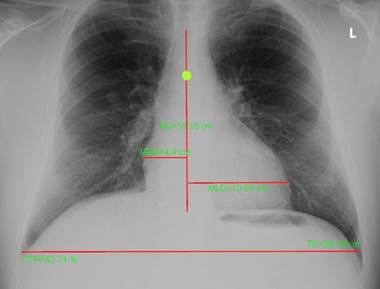
The four lines draw for the CTR measure need to be drawn in the following order:
1.ML= midline of the spine
2.MLD= maximum transverse diameter of the left side of the heart, which is a line drawn from the midline of the spine to the most distant point of the left cardiac margin
3.MRD= maximum transverse diameter of the right side of the heart, which is a line drawn from the midline of the spine to the most distant point of the right cardiac margin.
4.DT= diameter thorax (also referred to as ID = Internal diameter) greatest internal diameter of the thorax )
An example of the CTR measurement is shown below:
Once all four lines have been drawn, the CTR will be calculated and displayed on the image using the following formula: CTR = (MRD + MLD)/ID
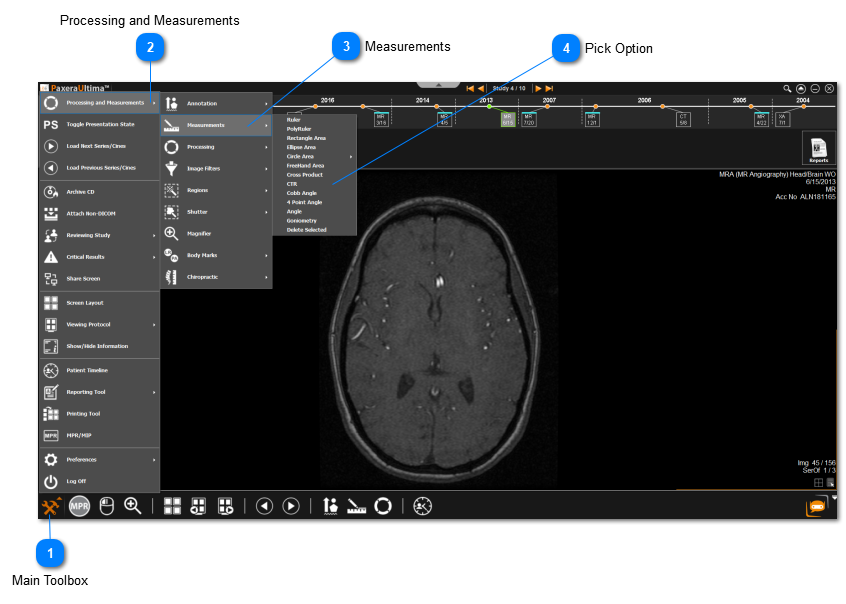
Main Toolbox
Click on the Main Toolbox from the bottom left corner.