Ultima User Guide (c) Copyright by PaxeraHealth Corp. 2021
18.5.0. Location Settings
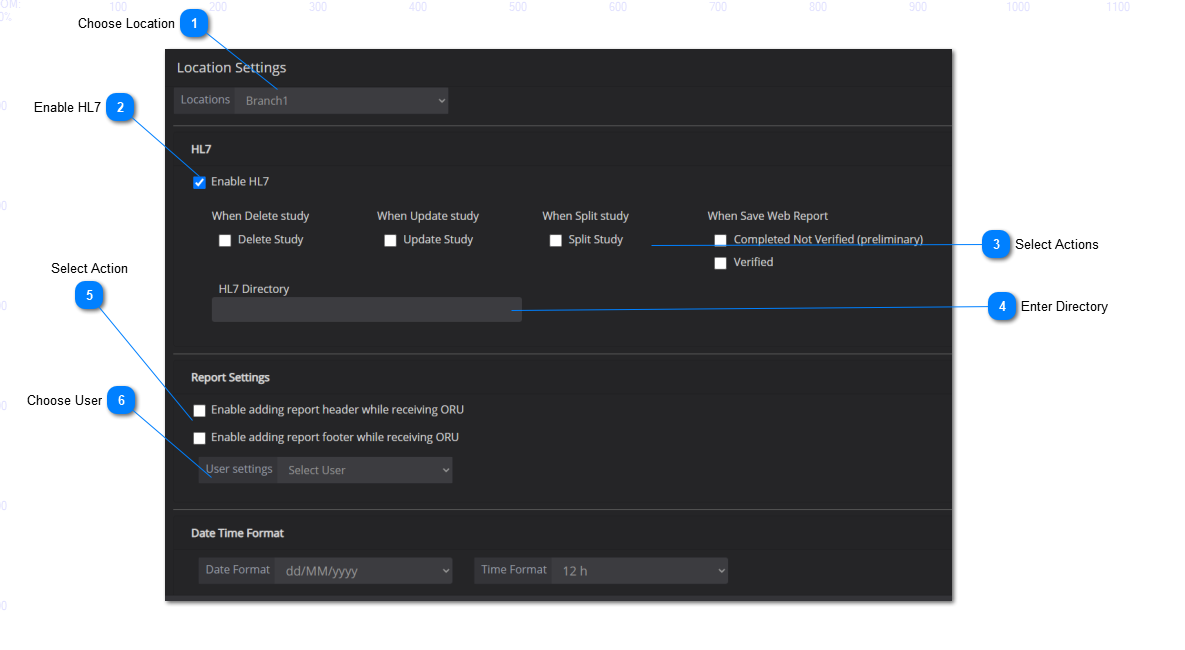
The location settings is where the user can configure HL7 and report settings if an integration with the EMR / RIS is present. See below for instructions:
Use the drop-down menu to select a location to apply the location settings.
Check off the box next to 'Enable HL7' to enable HL7 messaging.
Select appropriate actions by checking off the boxes.
Enter the HL7 directory in the blank.
For report settings, use the drop-down menu to choose the user to apply the settings.
Select the actions to apply to the user (the ability to add report header or footer with receiving ORU messages).
Save Changes: make sure to click on 'Save' to save your worklist settings.