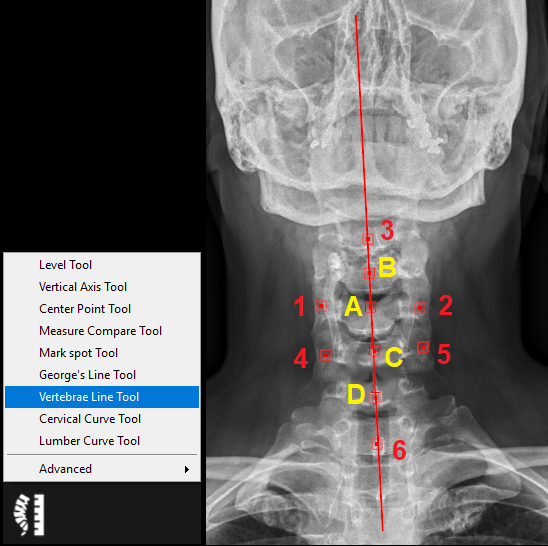
9.5.7. Vertebrae Line Tool
The vertebrae line tool is used to draw a line to represent the spinal canal based on six points. Follow the instructions below to use this tool:
1. Select the ‘Vertebrae Line Tool’ from the chiropractic toolbox and plot the following points (in red):
2. Point 1: click on the left/right side of the vertebral body.
3. Point 2: click on the opposite side (i.e. right/left) of the vertebral body.
4. A center point A will automatically appear between point 1 and 2.
5. Point 3: click on the spinous process.
6. A center point B will appear between point A and point 3.
7. Point 4: click on the left/right side of the following vertebral body.
8. Point 5: click on the opposite side of the following vertebral body.
9. A center point C will appear between point 4 and 5.
10. Point 6: click on the spinous process.
11. A center point D will appear between point C and point 6.
12. A line will appear which passes through points A-D and it represents the spinal canal.
13. You can adjust the point positions by clicking on the point and dragging it to a new position.