Ultima User Guide (c) Copyright by PaxeraHealth Corp. 2021
9.3.4. WW/WL & Alpha Levels
This interaction operation enables the user to change the view of the images by adjusting the WW/WL and alpha levels:
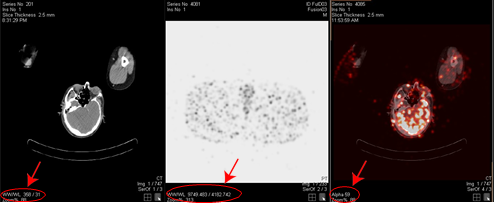
1. For the CT and PET image windows, right click and drag mouse over the CT/PET image will change the WW/WL of the image and will reflect in the fusion image.
2. For the fusion image window - right click and drag the mouse over the fusion image to change the transparency (i.e. alpha level) of the fusion image. The alpha level is for the fusion image only and is set to 50% by default.
The WW/WL and Alpha levels values can be found in the bottom left corner of the image window, as shown below: