19.5.1. Add / Edit Preset
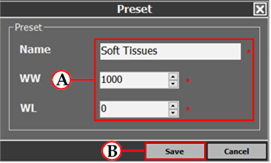
If a preset is added / edited, the following window will show:
Simply enter the name, WW, and WL (A) , and then click on the ‘Save’ button (B) .
 Remember to save
 Once the user has made all the edits to the WW/WL presets - ensure to click on the ‘ Save ’ button to make sure the changes are saved.