Ultima User Guide (c) Copyright by PaxeraHealth Corp. 2021
16.2.3. ED Overread
There are two methods to make an ED overread:
Perform ED overread on the worklist.
Perform ED overread on the study viewer.
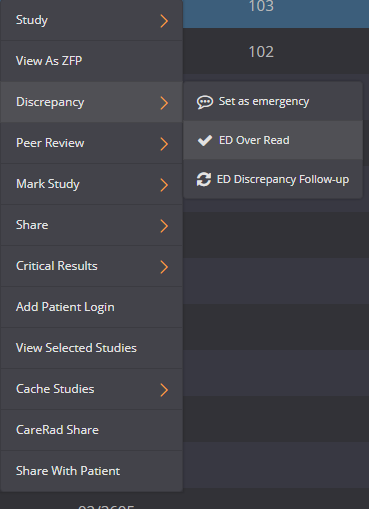
To give an ED overread on the worklist, follow the instructions below:
Right-click on the study that is set as an emergency with this icon .
2.A drop-down menu will appear, click on ‘Discrepancy’and then ‘ED Overread’.
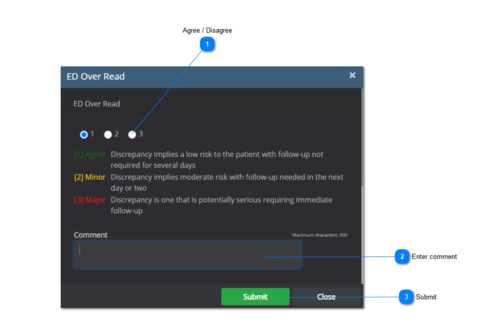
3. A new window will appear. Review the preliminary report by scrolling down in the menu and choose whether you agree with the report according to the following categories:
[1] Agree: Discrepancy implies a low risk to the patient with follow-up not required for several days.
[2] Minor: Discrepancy implies moderate risk with follow-up needed in the next day or two.
[3] Major: Discrepancy is one that is potentially serious requiring immediate follow-up.
4. Write a comment and click on 'Submit' when you are done.
5. The study icon in the Discrepancy column will be updated according to the agreement / disagreement of the preliminary report.
Major discrepancy found
Minor discrepancy found
Agreed by radiologist
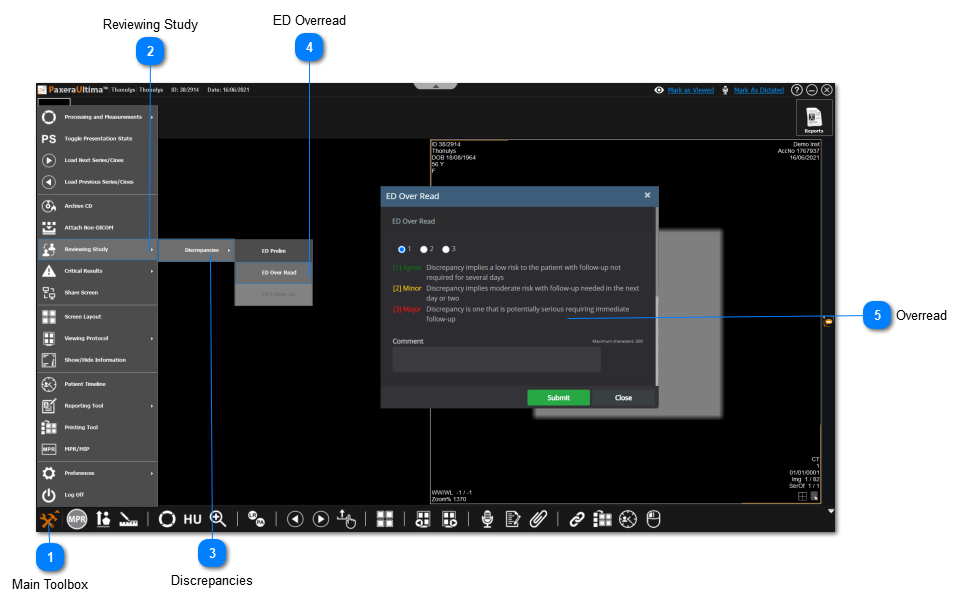
To give an ED overread on the worklist, follow the instructions below:
Main Toolbox
Click on the main toolbox from the bottom left corner.


 .
.