Ultima360
User guide
×
Menu
Index

12.2.4. Critical Results Statistics

 
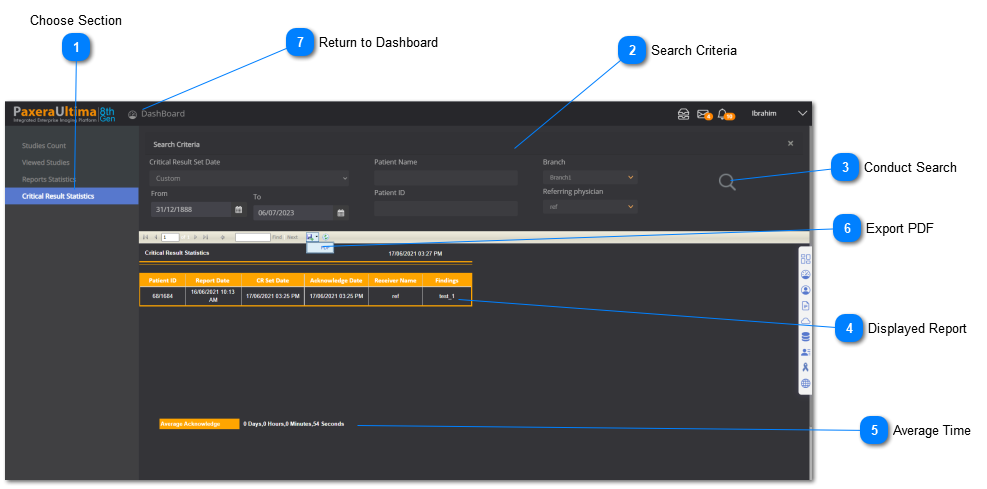
The critical results statistics page displays the graphical and tabular information regarding the critical result date(s), patient name and ID, branch, and referring physician. An overview of this page is given below:
 
12.2.4. Critical Results Statistics
1

Choose Section

1. Choose Section
Choose the 'Critical Results Statistics' section to see its dashboard report.
2

Search Criteria

2. Search Criteria
Filter out your report based on critical result date, patient name and ID, branch, and referring physician.
3

Conduct Search

3. Conduct Search
Click on this button to conduct your search.
4

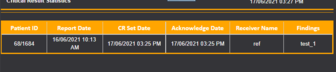
Displayed Report

4. Displayed Report
Your filtered report will display once you conduct your search.
5

Average Time

5. Average Time
The average acknowledgement time for your report will be displayed.
6

Export PDF

6. Export PDF
The report can be exported and downloaded as a PDF file onto the computer.
7

Return to Dashboard

7. Return to Dashboard
Click this button to open the drop-down menu to navigate back to the main dashboard.