Ultima360
User guide
×
Menu
Index

11.1.0. Cardio Structural Reports

 
There are three types of cardio structured reports available for use:
•             Cath - to create a cardiac catheterization report
•             Echo - to create a transthoracic echocardiography report for diagnosis & follow-up of heart disease.
•             EPS - to create a intracardiac electrophysiology study report.
 
11.1.0. Cardio Structural Reports
 
1

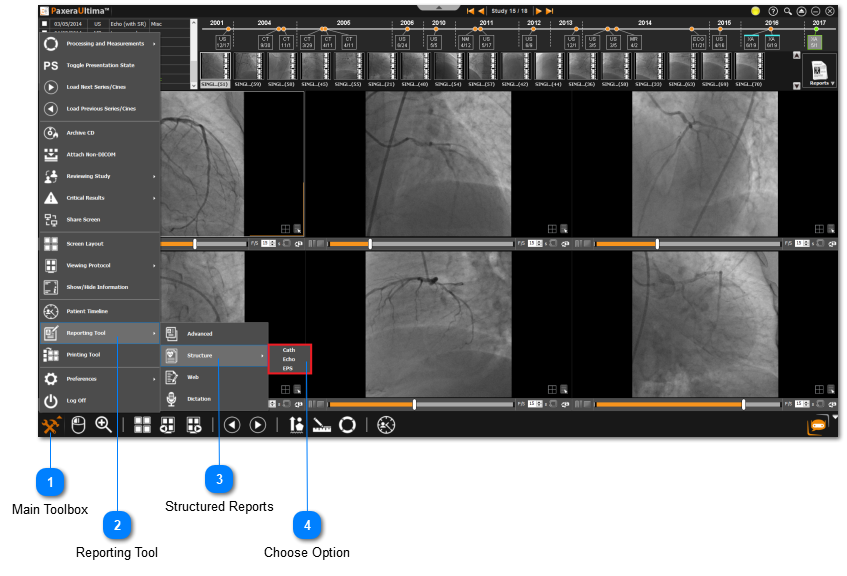
Main Toolbox

1. Main Toolbox
Click on the main toolbox from the bottom left corner.
2

Reporting Tool

2. Reporting Tool
Click on the 'Reporting Tool' button from the drop-down menu.
3

Structured Reports

3. Structured Reports
Click on the 'Structure' option from the reporting tool menu.
4

Choose Option

4. Choose Option
Select which cardiology structured reporting tool to open.
 
 
The general layout for all of the structural reports is the same. All of the structured reports contain report settings, which is used to add, edit, and delete information tags that comprise the report. The structured report tool also contains a design feature, which is used to edit the advanced layout of the report.
 
The main facet that differs between among the structured reports is the information fields that need to be filed in by the user - an overview of each specific report type will be given for the cath report, echo report, and EPS report.