Ultima User Guide (c) Copyright by PaxeraHealth Corp. 2021
10.6.0. MG Viewing Protocols
The MG tool has a number of predefined viewing protocol templates that are accessible from the bottom right corner of the study viewer screen when a MG study is open. Additionally, a few MG specific parameters are available when creating a new MG viewing protocol.
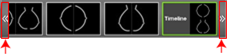
The user can switch between default MG viewing protocols by clicking on the arrows in the VP window located in the bottom right corner of the study viewer:
More on viewing protocols (VPs)
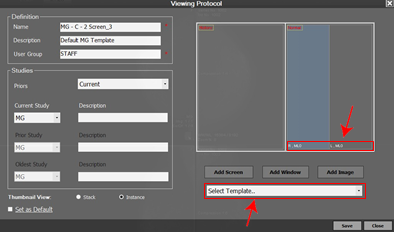
To learn more about accessing the VP settings, see Viewing Protcols section. The VP editor is shown below:
» The user can view the image position type label in the bottom left corner of each image window.
» The user can select a predefined template from the dropdown list of templates.
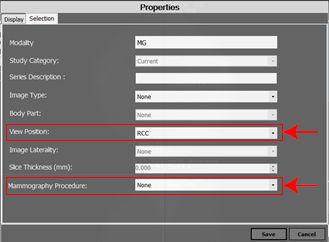
If the user double clicks on one of the image windows from the VP editor, a new window containing the screen properties will appear as shown below:
» View position- this option enables the user to set a specific MG type position for an image window. The dropdown list contains a number of different options to choose from.
» Mammography procedure- this option enables the user to set the VP for a specific proce- dure (i.e. standard MG or DBT). By default this option is set on none.