Ultima User Guide (c) Copyright by PaxeraHealth Corp. 2021
17.0.0. ZFP Viewer
Zero Foot Print Viewer is an incredibly easy and convenient way for healthcare professionals (HCP) to view images from different workstations within a facility as well as remote locations such as in the comfort of your home to hotel lobbies. ZFP can be accessed on any platform including your home computer, tablet, or cellular device and supports a wide range of modalities including: CR, DR, US, NM, normal and enhanced CT/MRI, standard and tomosynthesis mammography. It's extremely user-friendly, requires no downloads, and leaves no trace.
All browsers are supported (below are examples of commonly used browsers):
Google Chrome
Firefox
Internet Explorer
Microsoft Edge
To open a study in the ZFP viewer, follow the instructions below:
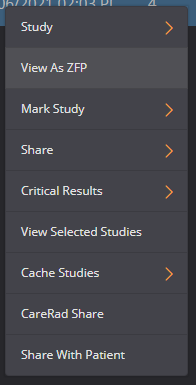
1. Right click on any of the columns from the selected study in the WorkList.
2.A drop-down list will appear, click on ‘View as ZFP’
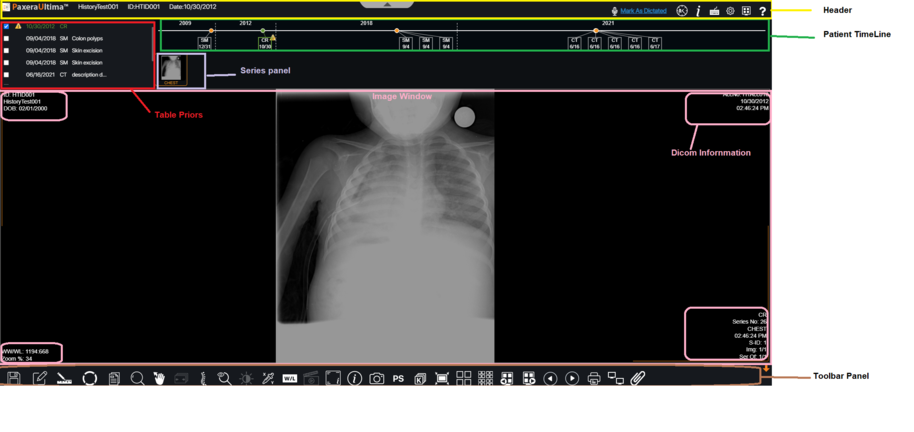
3. The ZFP study viewer will now launch (it is different from the main study viewer). An overview of the viewer is given below:
Header - contiains patient and study infoand tool for edit study
Patient Timeline - shows patient history in chronological order
Table priors - shows patient history in table with information
Series Panel - displays all the series included in the study
Image window - displays an image from the series. The number of image windows can be adjusted, instructions on how to do this will be given below
DICOM Information - displays the DICOM tags for the study including patient and study information
Toolbox panel - contains all the tools used to view and edit the study. Instructions on how to use the tools will be given below.